
Users and permissions
Use named accounts wherever practical. The customer role called Head Office Administrator is the business administrator. An Area Manager can work across assigned units. A Unit Manager manages their assigned site. Staff can perform authorised checks and issue actions, without general access to customer administration or billing.
Audience: Business administrators and permitted managers
Last reviewed: 2026-11-01
Use named accounts wherever practical. The customer role called Head Office Administrator is the business administrator. An Area Manager can work across assigned units. A Unit Manager manages their assigned site. Staff can perform authorised checks and issue actions, without general access to customer administration or billing.
Permissions are limited by both role and location assignment. Being assigned to two units does not grant access to other sites. Some menus are deliberately absent for frontline staff. Rest Easy's platform administration role is not a customer role.
Add and assign a person
- Open Users using an account permitted to manage users.
- Choose the creation action and enter the person's work details.
- Select only a role you are authorised to grant and the required business-unit assignments.
- Save and arrange the account setup invitation through the available control.
- Ask the user to complete setup, sign in and confirm the intended locations are visible.
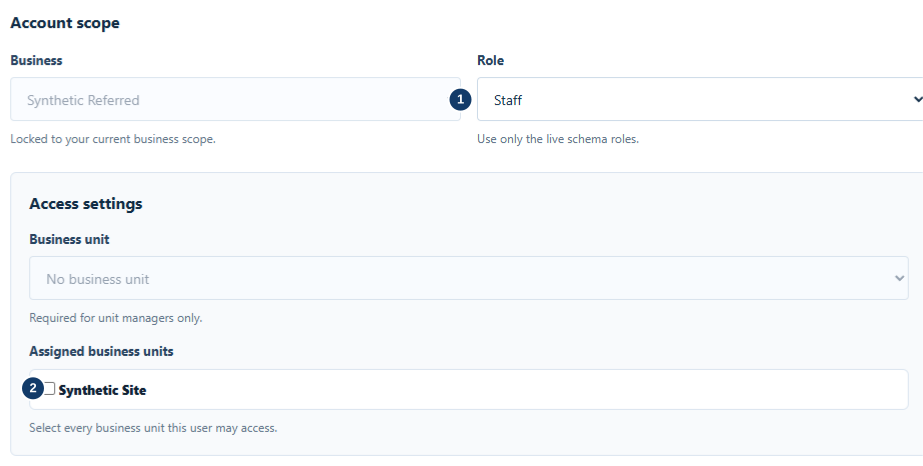
- Select the appropriate role.
- Assign only the required business units.
When a person changes role, review their unit assignments as well as their role. When they leave, deactivate or revoke access through the user-management controls. Do not share their login with a replacement employee. Historical attribution should remain attached to the original staff member.
Personal and shared phones
A valid personal-phone session normally persists between routine scans. Staff should not need to enter a PIN on every scan. Reauthentication can still be required after expiry, inactivity or a security event.
Shared devices can use the existing shared-staff username/PIN workflow where configured. Ensure the acting staff member is correctly identified. Never leave an administrator session available to everyone using a shared device. Lock the device when unattended and log out when handing it to another person.
If you forget a password or an invitation expires, contact your business administrator for the supported recovery/resend route. Do not guess passwords repeatedly or send passwords in support email. Your administrator can advise on the recovery options available to your account.