
Digital restroom checks
There is no individual cleaner assignment or cover-management requirement. Follow the business's rota and safety procedure; any appropriately authorised staff member can perform a check.
Audience: All customer roles
Last reviewed: 2026-11-01
Before the first check of a shift
- Confirm which rooms are in service and which routine your manager expects.
- Check your phone has a connection, charge and the necessary account access.
- Confirm the room name before recording anything. A successful scan of the wrong sign still identifies the wrong room.
There is no individual cleaner assignment or cover-management requirement. Follow the business's rota and safety procedure; any appropriately authorised staff member can perform a check.
Scan → Inspect → Record → Confirm
- At the correct room, tap the staff NFC sign with a compatible phone. Open the link if prompted.
- Sign in only if your session is not valid. Confirm the displayed Control Point name.
- Perform the physical inspection and any required work. Scanning alone is not completion.
- If useful, open Add a note (optional) and enter factual check notes. Do not put passwords, medical information or unnecessary personal information in a note.
- Select Complete check once. While Recording check… is displayed, wait for the result.
- Confirm Check recorded and review the recorded time and staff member before leaving.
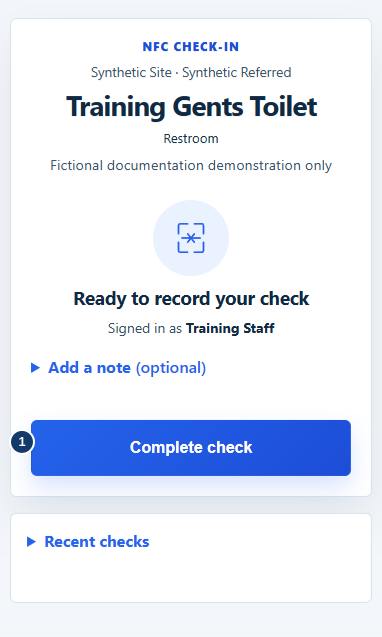
- After the inspection and work, select Complete check.
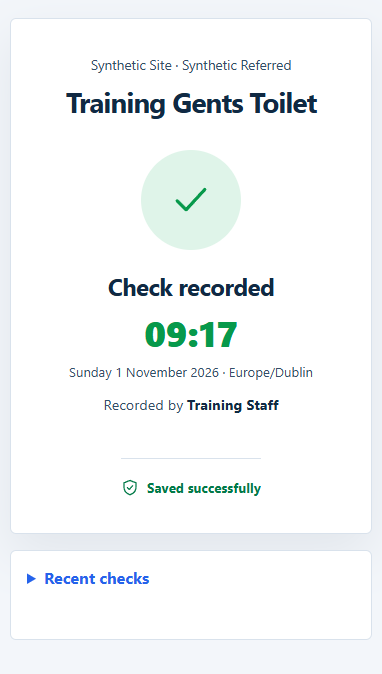
The check form records completion and allows an optional note. Your local cleaning checklist may contain more physical tasks than the application asks you to enter.
A customer QR code can open the feedback journey rather than a staff check. Do not submit a customer rating as evidence of a staff inspection. Use the staff route supplied with the sign and your authorised account.
Errors, retries and mistakes
If the result is unclear, keep the page open and allow the page to recover the result. Do not repeatedly start fresh scans to force a result. If necessary, ask a manager to check the room history before trying again. A loading state or offline page is not confirmation that a check was saved.
Completed records form an audit history. Do not assume a completed check can be edited or backdated. If a mistake occurs, tell a manager, retain the original event and use the available factual note/support procedure. Never record work that has not taken place.