
Frontline employee quick start
Rest Easy · Fictional training screenshots · Revised 1 November 2026
1. Scan → Inspect
- Take a connected, compatible phone to the correct restroom.
- Tap the staff NFC sign and check the room name.
- Sign in if asked. A valid personal-phone session normally avoids repeated login; shared devices may require the shared-staff username/PIN.
- Inspect the restroom and perform the required cleaning or replenishment. Scanning is not cleaning.
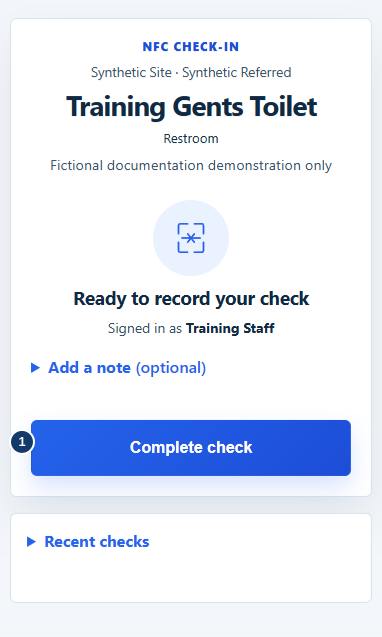
- After the inspection and work, select Complete check.
2. Record → Confirm
- Add an optional factual note if needed.
- Select Complete check once. Wait while Recording check… appears.
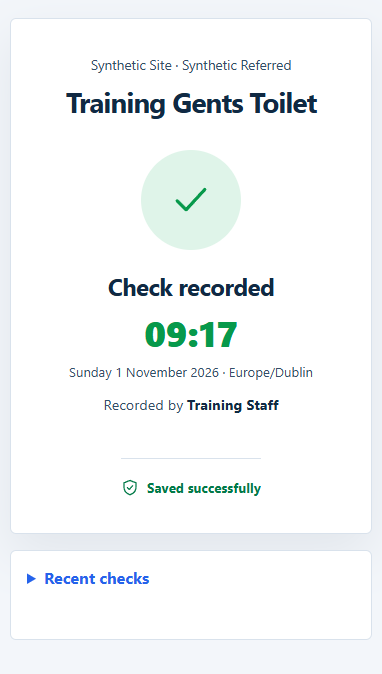
- Look for Check recorded and confirm the room, time and staff member.
- If the result is uncertain, keep the page open and ask your manager to check history before starting a fresh submission.
If the sign fails, check connection and the correct phone/camera route. Follow the agreed temporary procedure and tell your manager. A customer QR rating is not a staff check.
For a wet floor or other urgent hazard, take the agreed physical safety action immediately. Do not wait for an app notification.
Full procedures: Customer handbook.