
Issue management
An Open issue has not yet been acknowledged or resolved. Acknowledged means someone has recognised it and begun handling it. Resolved means the recorded corrective action is complete. The system records acknowledgement and resolution separately; acknowledging is not a substitute for fixing the problem.
Audience: Business administrators and permitted managers
Last reviewed: 2026-11-01
- Customer report
- Manager reviews
- Acknowledge
- Correct
- Resolve
- Review history
An Open issue has not yet been acknowledged or resolved. Acknowledged means someone has recognised it and begun handling it. Resolved means the recorded corrective action is complete. The system records acknowledgement and resolution separately; acknowledging is not a substitute for fixing the problem.
- Open Open Issues or a permitted room detail/check view.
- Confirm the room, reported issue, priority, opening time and displayed deadline.
- Inspect the actual problem. Take immediate physical safety precautions where needed.
- Use Acknowledge when taking responsibility under your business's procedure.
- Perform the corrective work, then use Resolve and enter any required resolution information.
- Confirm the saved result and review the room's history.
Do not assume an issue has been assigned to a particular cleaner. Notify the appropriate person through the business's procedure when responsibility needs coordination. Recurring problems may need a maintenance response rather than repeated cleaning alone.
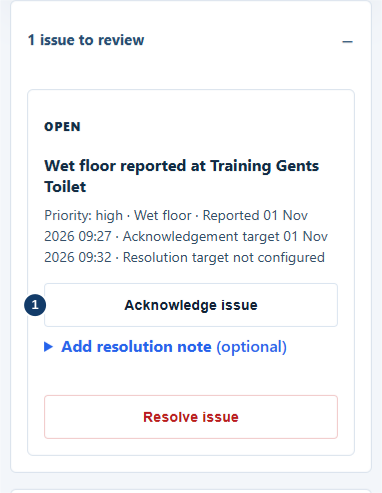
- Acknowledge after reviewing the actual problem.
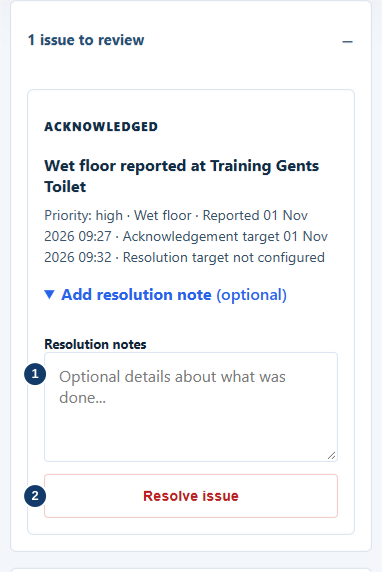
- After corrective work, enter a factual resolution note.
- Resolve only when the corrective work is complete.

Acknowledgement and resolution can have different targets. Read the deadline shown for the issue and follow your business procedure. Acknowledging an issue does not stop the need for corrective work.
Use room history and permitted reports to review resolved work. Ordinary Open Issues views may intentionally exclude resolved records; an empty filtered list does not establish that no earlier issues existed.