
Customer feedback
Customers scan the public feedback QR sign and see the identified business/room. They choose Poor, Okay or Great, can select applicable predefined issues, then select Submit feedback. They do not need an account, PIN, name or email. There is no public free-text comment field in the approved journey.
Audience: Business administrators and permitted managers
Last reviewed: 2026-11-01
- Scan QR
- Choose rating
- Select issues if needed
- Submit
- Thank you
Customers scan the public feedback QR sign and see the identified business/room. They choose Poor, Okay or Great, can select applicable predefined issues, then select Submit feedback. They do not need an account, PIN, name or email. There is no public free-text comment field in the approved journey.
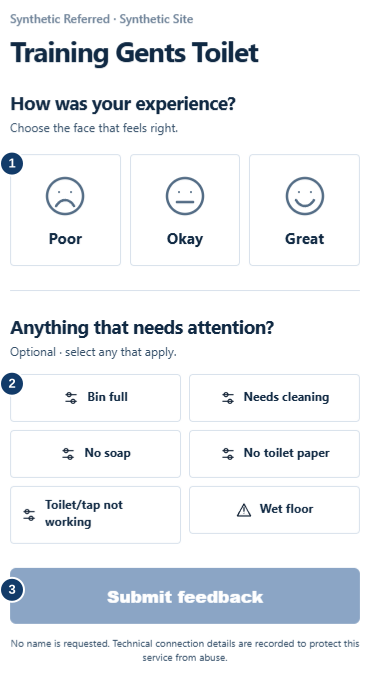
- Choose Poor, Okay or Great.
- Optionally select the issues that need attention.
- Submit once and wait for the thank-you message.
Each rating can be submitted without selecting an issue. More than one category can be selected. The selected issue categories, rather than the mere presence of a low rating, drive the configured issue-creation workflow. Positive ratings are still recorded. Available features depend on your plan: Essentials can collect ratings, while Premium enables customer-feedback visibility and customer issue reporting.
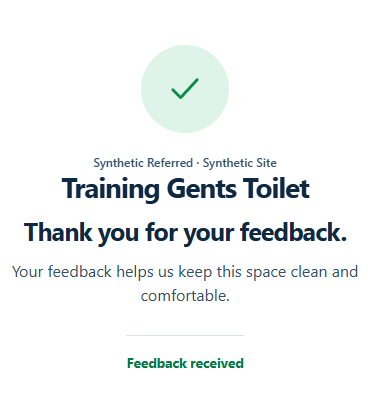
After a successful submission, the thank-you screen confirms receipt. A repeated or rate-limited attempt may be refused; the customer should wait rather than repeatedly resubmit. A report represents what a customer submitted, not an independently verified inspection.
Feedback does not request a customer's identity, but technical request information such as IP address and browser details can be processed for security and abuse prevention. “Anonymous feedback” should not be described as “no technical information is ever collected”. Refer privacy questions to the published privacy notice.