
Subscriptions and Account Management
Your available features, control-point allowance and subscription terms depend on your organisation's agreed Rest Easy plan. Your administrator can review the current account information or contact Rest Easy for assistance.
Audience: Business administrators and permitted managers
Last reviewed: 2026-11-01
Your available features, control-point allowance and subscription terms depend on your organisation's agreed Rest Easy plan. Your administrator can review the current account information or contact Rest Easy for assistance.
Review your account
- Sign in with your Head Office Administrator account.
- Open Subscriptions from the menu available to you.
- Find the correct business unit. Read its Status and active dates.
- Check the renewal and read-only information shown. Contact Rest Easy if the dates do not match your agreement.
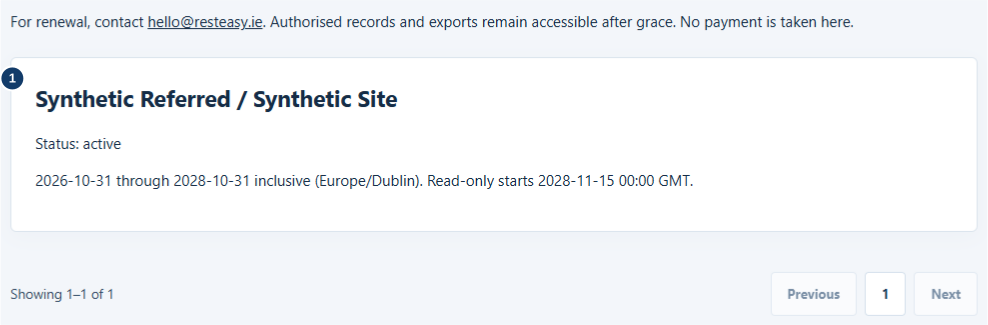
- Read status, active dates and renewal information for this unit.
Features, allowances and changes
Available features and the number of Control Points you can create depend on your agreed plan. Check the controls and account information available to your role. If an action is unavailable, ask your business administrator to check both permissions and subscription access.
To request a plan, capacity or account change, contact hello@resteasy.ie. Include your business and location names, the change needed and a contact person. Never email a password or card details. Where your account provides billing controls, review the confirmation and effective date before submitting a change. Payment and invoice information varies by customer arrangement; refer to your individual agreement or invoice.
Renewal, expiry and restored access
Review renewal information before the displayed end date. Administrators may receive account notices in Rest Easy and by email. During an applicable renewal grace period, the application shows warnings while normal operations continue. After that period, new operational activity becomes read-only. Authorised historical records, exports and account administration needed for renewal remain available.
Contact Rest Easy to confirm renewal, cancellation or missing account documents. Keep the confirmation and effective date. When access is reactivated, permitted operations resume without changing historical records. The dates and terms shown for your organisation govern your account; do not use another customer's arrangement as a guide.
Related: missing access · roles and permissions.