
Notifications
Notifications support, rather than replace, an agreed response procedure. Recipients depend on current roles, unit assignments and configured policies. A person who loses access should not continue receiving operational information simply because they received an earlier alert.
Audience: Business administrators and permitted managers
Last reviewed: 2026-11-01
Notifications support, rather than replace, an agreed response procedure. Recipients depend on current roles, unit assignments and configured policies. A person who loses access should not continue receiving operational information simply because they received an earlier alert.
Customer issue alerts and escalations operate independently of missed-check notification pauses. An acknowledged but unresolved issue can still require attention under its configured policy. Alert timing depends on your settings and successful delivery.
Missed-check notification pauses
- Open Missed-check notifications if your role permits it.
- Select the permitted location, enter Pause until and a factual Reason.
- Save and verify the expiry shown. Revoke the pause early when it is no longer needed.
A pause records who requested it, the reason and its time range. It expires automatically. Expected checks and compliance history continue; missed windows are not erased. Use schedule exclusions for a genuine exceptional closure, not a notification pause.
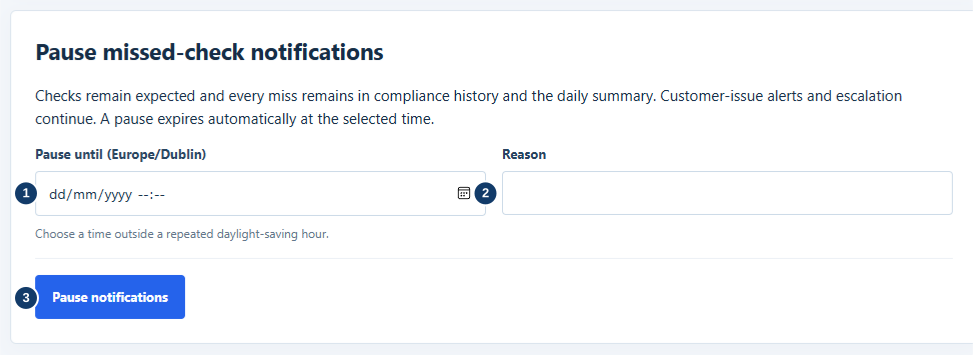
- Set the local expiry date and time.
- Record why notifications are paused.
- Save and check the expiry; checks still count.
Area Managers receive consolidated daily exception summaries for their assigned locations, normally at 18:00 in the business unit's timezone. Business administrators can configure the summary time. Each summary covers the period since the previous summary. It includes missed checks even when immediate notifications were paused, and labels those pauses clearly. No exception email is sent when there are no reportable exceptions.
Push notifications require a supported browser/device, notification permission and successful registration. Use Enable notifications where shown. An email can leave Rest Easy successfully without reaching your inbox. If an alert is missing, check the in-app record, site assignments, preferences/device permissions, spam filtering and any visible delivery warning; escalate through support without delaying physical action.